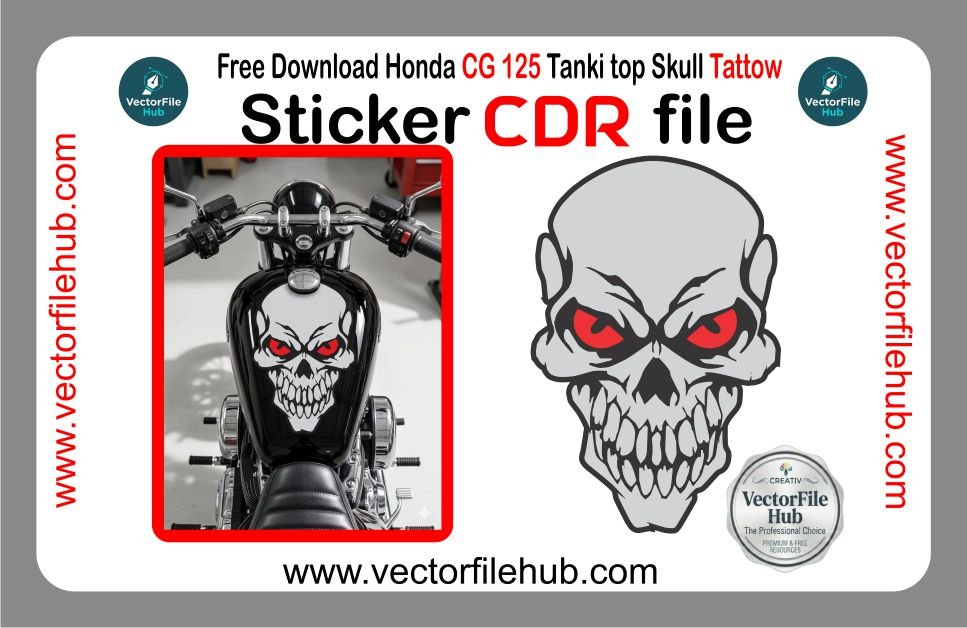
When it comes to vehicle modification, nothing makes a bolder statement than aggressive, high-contrast imagery. For riders and enthusiasts looking to give their motorcycle a fierce edge, the Evil Skull Tattoo design is a perennial favorite. A well-placed skull decal on a fuel tank or side panel instantly transforms a standard machine into a custom masterpiece. At Vector File Hub, we understand that a great design is only as good as its technical execution, which is why we are offering this premium, high-detail skull vector for free.
Whether you are aiming for a “dark rider” aesthetic or a professional-grade decal for a client, this vector file is engineered to deliver sharp lines and intimidating detail. The menacing red-eyed skull design is specifically optimized for vinyl cutting, ensuring that every tooth and bone structure is captured perfectly by your plotter.
Ultra-High Resolution: Masterfully crafted vector paths that remain crisp and sharp at any scale, from small helmet stickers to full-tank decals.
Fully Customizable: The CDR file is organized into logical layers, allowing you to change the red eye color, adjust line thickness, or modify shading in seconds.
Ready-to-Cut Precision: Optimized with minimal nodes and closed paths, making it “plug-and-play” for vinyl cutters, laser engravers, and CNC machines.
Aggressive Styling: A unique, hand-refined skull illustration that balances classic tattoo art with modern digital precision.
Technical Specifications
Format: .CDR (CorelDraw Master File)
Compatibility: Fully compatible with CorelDraw X3, X7, 2021, and all newer versions.
License: Copyright-free (Free for both personal and commercial projects).
Color Mode: CMYK (Optimized for professional printing and vinyl selection).
User Guide: How to Use the Skull Vector File
Download: Save the CDR file directly from the download section below.
Open: Launch CorelDraw and import the file.
Scale: Measure the application area (e.g., your bike’s tanki top). Scale the vector proportionally to ensure the design fits the contours perfectly.
Edit (Optional): If your bike is a specific color, you might want to change the grey fill to silver or white for better contrast.
Cut & Apply: Export to your cutting software. Once cut, use high-quality transfer tape to apply the decal to a surface cleaned with alcohol for long-lasting adhesion.